
Free browser extension
LinkedIn's daily puzzles, solved in milliseconds.
LarpedIn reads the board straight from the page, finds the answer with an exact solver and plays it for you. Zip, Queens, Tango, Patches and Wend.
- No AI, no guessing
- Nothing leaves your browser
- Open source

Read, solve, play
The same three steps on every board. Below is a tiny Zip-style puzzle and a real backtracking search running in your browser, slowed down so you can follow it.
On your machine, this demo puzzle solves in … on average over 200 runs.
Five puzzles, five solvers
Each game gets a solver written for its own rules. These are real boards, solved by the extension's code.
-
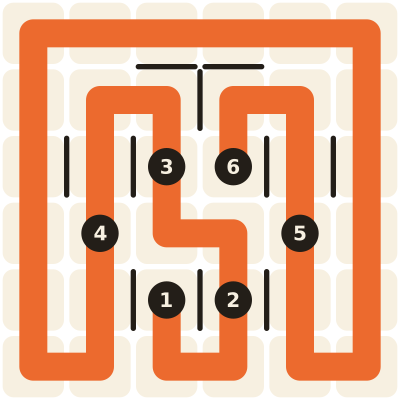
Zip
Draw one path through every cell, passing the numbers in order.
Path search that spots forced moves and cut-off cells.
-
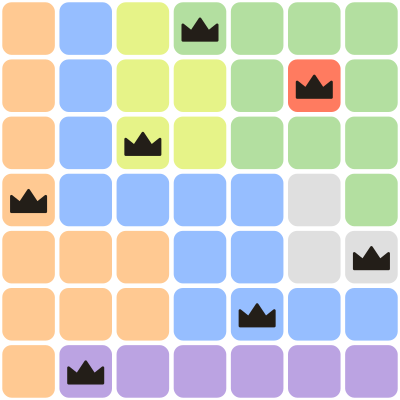
Queens
One queen in every row, column and colour region, and no two touching.
Bit-mask search that counts what each region has left.
-
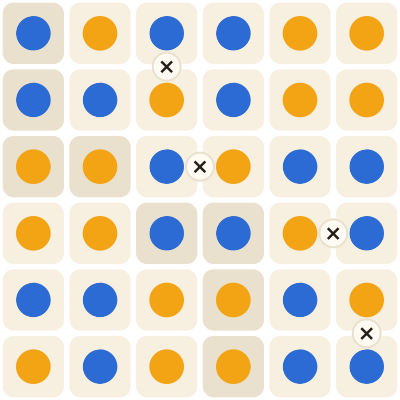
Tango
Fill the grid with suns and moons: balanced lines, no three in a row, every = and × respected.
Rule propagation that tests each cell both ways.
-
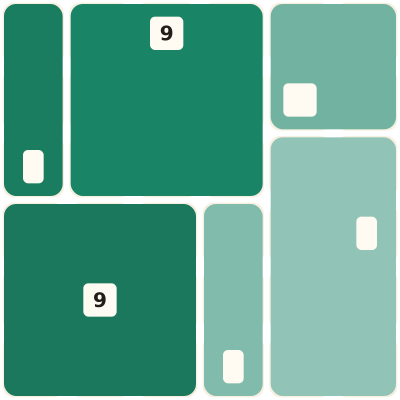
Patches
Cut the grid into rectangles, each matching the shape and size of its one clue.
Exact cover search over every rectangle that fits.
-

Wend
Find the hidden words that snake through the grid and use every tile once.
A 243,000-word dictionary plus exact cover.


Install
Pick your browser. From its store it's one click: the extension sets itself up, shows up in your extensions list and updates itself.
-
Chrome Web Store
Chrome, Brave, Opera, Arc and Vivaldi on Windows, Mac, Linux and ChromeOS.
Add to Chrome -
Edge Add-ons
Microsoft Edge on Windows and Mac. Edge can also install from the Chrome Web Store.
Get it for Edge -
Firefox Add-ons
Firefox on Windows, Mac and Linux, and Firefox for Android.
Add to Firefox -
App Store
Safari on Mac, iPhone and iPad. Install the app, then turn the extension on in Safari.
Get it for Safari
Listings marked "Coming soon" are still in review. Until then, the steps below install the same extension by hand.
By hand in Chrome, Edge, Brave or Opera
-
Download the zip
-
Unzip it
Double-click it on a Mac, or right-click and choose Extract All on Windows. Keep the
larpedinfolder: the browser loads the extension from it. -
Open the extensions page
Web pages can't link there, so copy the address and paste it in the address bar.
-
Turn on Developer mode
The switch is in the top-right corner (bottom-left in Edge).
-
Click "Load unpacked"
Choose the
larpedinfolder, the one that containsmanifest.json. -
Open a LinkedIn game
A small panel appears on the page. Press Alt+S (Option+S on a Mac) or click Solve.
Firefox, before the store listing
Firefox only keeps add-ons it has signed, so a hand-loaded copy lasts until you quit. Download larpedin-firefox.zip, open about:debugging#/runtime/this-firefox, click Load Temporary Add-on and pick the zip.
Safari, iPhone and iPad
Apple only runs Safari extensions that come inside an app, so there's no hand install. Once the App Store app is out, install it and turn on LarpedIn in Safari's extension settings (on iPhone: Settings, Apps, Safari, Extensions).
Updating, removing, or using a userscript instead
Update: store installs update themselves. For a hand install, download the new zip, replace the old folder's contents, then click the reload arrow on the LarpedIn card in the extensions page.
Remove: click Remove on the card in the extensions page, then delete the folder.
Tampermonkey: if you already use Tampermonkey, you can install the userscript version instead. It runs the same code, without the toolbar popup.
One shortcut, one small panel
- Alt+S
- Solves the puzzle on screen. On a Mac it's Option+S.
- Timings
- The panel shows how long reading, solving and playing took.
- Auto-solve
- Optional. Every new, unsolved board is solved as soon as it appears.
- Your archive
- Every puzzle you open is kept in your browser. Export saves them all as one JSON file.

Want more than one a day?
GamedIn has five puzzles in the same spirit: Trace, Crowns, Pairs, Plots and Wind. No daily limit, and every board is made on your device with exactly one solution.
Play GamedIn
Questions
Is this made by LinkedIn?
No. LarpedIn is an independent fan project. It is not affiliated with, endorsed by, or sponsored by LinkedIn or Microsoft. "LinkedIn", "Zip", "Queens", "Tango", "Patches" and "Wend" belong to their owners and are used here only to say what the extension works with.
Can using it get my account in trouble?
Possibly. LinkedIn's User Agreement restricts automated tools on its site, and using one could put your account at risk. Use it at your own risk, ideally just for fun or to learn how puzzle solvers work. The extension doesn't hide what it does: it's your choice when and whether to press Solve.
What does it read, and does it send my data anywhere?
It sends nothing anywhere. Here is exactly what it does:
- It only runs on
www.linkedin.com, and does nothing unless the address is one of the game pages. - On a game page it reads the puzzle grid and nothing else: no profile, feed, messages or contacts.
- It contains no network code at all: no
fetch,XMLHttpRequest, WebSocket or beacon calls, no analytics, no remote scripts. - Its only browser permission is
storage, to sync your settings. A small background worker opens the welcome page on install and handles the Alt+S shortcut. It has no access to any other site. - Your settings are kept in the browser's extension storage, and the puzzle archive in the page's own local storage, both on your computer. Export saves a file to your computer; it doesn't upload it.
Don't take our word for it: the source is public, and it's small enough to read in one sitting.
Does it use AI?
No. Each game has a hand-written exact solver: a search that tries possibilities and uses the puzzle's rules to rule most of them out early (constraint propagation). If there's an answer it finds it, and the answer is always correct. That's why it takes well under a millisecond on most puzzles instead of seconds.
Why does the store button say "coming soon"?
Each store reviews an extension before listing it, which takes from a day to a few weeks. Until a listing is live, the button takes you to the hand-install steps, which install exactly the same code.
Does it work in Firefox, Safari or on my phone?
Yes, from each browser's store: Chrome, Edge, Brave and Opera on computers; Firefox on computers and Android; Safari on Mac, iPhone and iPad. Chrome on phones can't run extensions at all, so on Android use Firefox, and on iPhone use Safari. It's tested most in desktop Chrome.
It stopped working. What now?
LinkedIn can change its game pages at any time, which can break reading or playing. Check GitHub for a newer version, or open an issue there with the message shown in the panel.
Is it free?
Yes. It's free and open source, with no accounts, ads or tracking.
Why "LarpedIn"?
Because posting a 3-second Queens time is LARPing (live-action role-playing) as someone who's very good at Queens. Be nice about it.